Using Email Marketing to Promote Your Merch Line
Merch by Amazon gives you massive reach—but it doesn’t give you customer data. Email marketing bridges that gap by helping you:
- Build relationships with customers
- Drive repeat sales and loyalty
- Control timing and frequency of your marketing
- Launch new designs with greater impact
In this article, we’ll walk through exactly how Merch by Amazon sellers can leverage email marketing—legally and effectively—to grow sales and engagement.
1. Understanding Amazon’s Limitations
Important: Amazon strictly limits how you can contact buyers on their platform. You cannot email customers offering promotions or directing them away from Amazon. But you can build your own email list off-Amazon—from your website, social channels, or other sales platforms.
Once you’ve built your list, you can:
- Notify subscribers of new Merch launches
- Share coupon codes that trigger on Amazon
- Send lifestyle value content (gift guides, styling tips)
- Build long-term brand loyalty—beyond single purchases
2. Why Email Works for Merch Sellers
A. Ownership & Control
You own your list—no algorithmic disruption, no gatekeepers.
B. Repetition & Recall
Multiple contacts deepen impact—increases open rates, click-throughs, and sales.
C. Hyper-Personalization
Segment by interest (sports fans, pet lovers), geography, or engagement—sending targeted emails boosts conversions dramatically.
D. ROI & Measurement
Email offers up to $44 in ROI per $1 spent. With the right setup, results are measurable in opens, clicks, and attributable Amazon sales.
3. Building Your Email List
A. Off-Amazon Channels
Use tools like a simple website, Linktree, or Instagram bio to collect signups via email forms.
- Offer gated content: e.g., “Get our FREE 10-page design styles mockup guide”.
- Launch Giveaways: “Enter for a chance to win a Merch gift pack.”
- Use minimal friction forms—name + email only.
B. Segment Early
Ask signup questions like “Favorite theme?” and tag accordingly in your email tool (e.g., Mailchimp, Klaviyo). This helps in later targeting .
4. Crafting Effective Email Campaigns
Here are the five key campaign types that work best for Merch sellers:
1. Welcome Sequence (3–5 emails)
- Email 1: Welcome + brand story + soft Merch link (“Check out our bestsellers”)
- Email 2: Outline brand values, “how we design”
- Email 3: feature top products, early promos (“You’re first to know”)
- Email 4: Prompting to follow on social (UGC generates future opt-ins)
- Email 5: A small token: “Here’s 10% off—shop now”
2. New Release Alerts
Notify subscribers when you launch a new design or niche—“Just dropped: Plant Mom tee!” Keep it short, compelling, and include a single CTA button linking to Amazon.
3. Themed Campaigns / Gift Guides
Send curated bundles: “Top Gifts for Cat Lovers” or “Spring Vibes Collection.” Use visuals and callouts like “Perfect for March birthdays.”
4. Abandoned Cart Reminders (via website)
If using a site with cart integration, send timely reminders (“Forgot something? Your design is waiting”) with direct buy links to Amazon.
5. Re-Engagement or VIP Offers
After inactivity, remind customers of saved favorites, offer a “thank you” discount, or showcase merchandise in their interest categories.
5. Email Marketing Best Practices
A. Crafting High-Impact Subject Lines
- Keep it short (<50 characters)
- Use personalization: “John, your new favorite tee is here”
- Spark curiosity or demand: “Just 50 of this design—act fast!”
B. Write for Mobile Readers
Use short paragraphs, bold CTAs, and clear buttons that adapt to mobile screens.
C. Focused Content
Blend promotions with value—behind-the-scenes design notes, styling tips, or customer photos.
D. Segment & Personalize
Send based on interest: pet lovers get pet tees, fitness fans get activewear—improves open & click rates by ~200%.
E. A/B Testing
Try different subject lines, send times, and layouts. Track open rates and clicks to dial in best messaging.
F. Compliance & Deliverability
Use confirmed opt-ins, easy unsubscribe buttons, and a reputable ESP. Watch for bounce and spam metrics.
G. Strategic Cadence
Start with 1–2 emails per month. Over-emailing leads to fatigue; under-emailing underutilizes your channel.
6. Measuring Success & ROI
Track measurable goals:
- Open rate >20%
- CTR >3%
- Conversion rate from clicks (~1–3%)
- Revenue per email send (e.g., $300 in sales from 1,000 emails = $0.30 revenue per send)
- ROI per dollar: Email cost may be < $0.10 per send using platforms like Mailchimp
Note: Use Google Analytics UTM tags to identify Amazon traffic.
7. Common Mistakes to Avoid
- Buying email lists – kills deliverability and trust
- Spammy language – avoid “FREE,” all-caps, or link-overload
- Linking off-Amazon too aggressively – steer only to Amazon product pages
- Over-emailing fans – quality beats frequency
- Under-segmentation – generic blasts underperform
8. Real-Life Merch Email Campaign Examples
From leading Merch sellers:
“Our welcome series gets a 32% open rate—then we launch a new tee, and see a 3–4% click rate immediately after launch.”
“Gift guide emails in December bring in ~20% of holiday sales—they love the curated picks!”
Shared insights highlight that email drives roughly 10–15% of revenue when integrated with Merch sales.
9. Email Marketing Launch Checklist
| Task | Done? |
|---|---|
| Email list capture system set up | |
| Welcome sequence drafted & scheduled | |
| Segments in place (themes, interests) | |
| Launch template ready (subject, header, body, CTA) | |
| Device/mobile check done | |
| UTM-tagged Amazon link inserted | |
| Email cadences planned (monthly/launch-based) | |
| Metrics dashboard ready (open, click, sales) | |
| A/B test plan ready | |
| Compliance check done |
Bonus: Email Design Best Practices
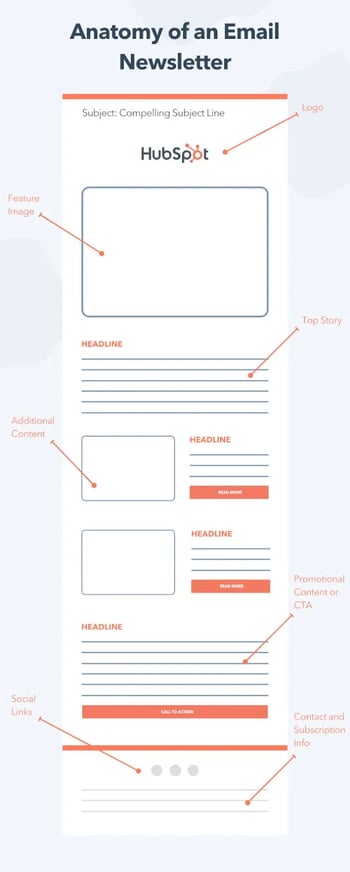
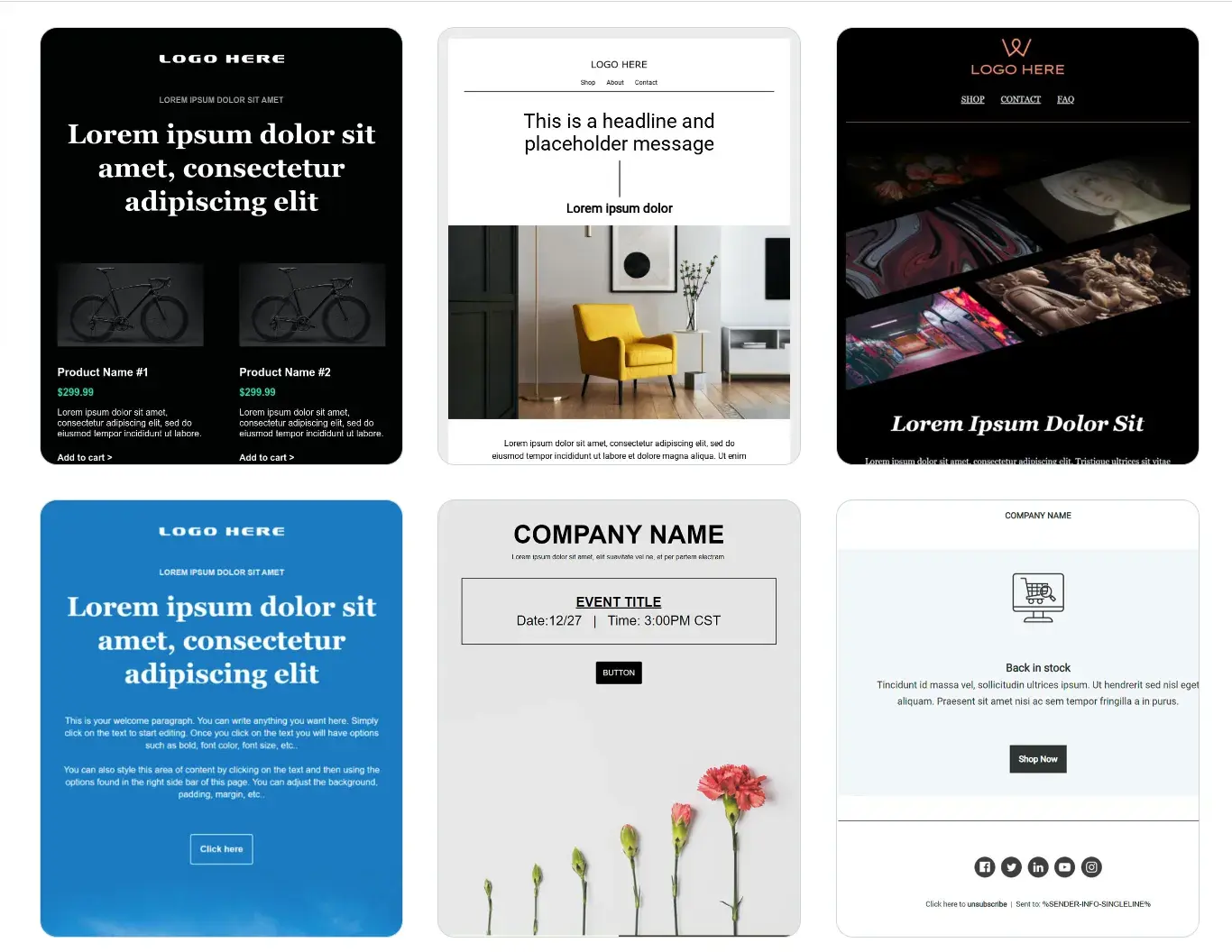
Design matters just as much as your message. Whether you’re promoting your latest Merch by Amazon product or delivering a newsletter to fans, your email layout can make or break engagement. Here’s how to ensure your emails not only get opened—but get clicked.
1. Keep It Clean and Focused
- Use a single-column layout—great for mobile and easier to read.
- Stick to one primary call-to-action (CTA) per email (“Shop Now,” “See What’s New,” etc.).
- Don’t overcrowd the layout with competing links or too much text.
2. Prioritize Visual Hierarchy
- Place your logo and header image at the top.
- Use headline > subhead > image > CTA flow.
- Make CTAs bold and easy to find—colored buttons with short copy like “Grab It Now.”
3. Use High-Quality Images
- Showcase your Merch designs using lifestyle mockups (people wearing your tees, holding your notebooks, etc.).
- Ensure all images are compressed for fast load times but still crisp.
4. Match Your Brand
- Use your brand’s color palette and fonts for consistency.
- Include a footer with social links, your website, and brand story.
5. Design for Mobile First
Over 70% of emails are opened on mobile. Make sure:
- Fonts are minimum 14–16pt
- Buttons are large enough to tap
- Line spacing is comfortable
- Images scale properly and don’t break layouts
6. Keep Text Minimal but Impactful
- Use short sentences and clear value statements.
- Break up text into 2–3 sentence paragraphs.
- Use bolding and bullet points to highlight key info.
7. Dark Mode Friendly
Ensure your emails look good whether someone is using light or dark mode:
- Avoid transparent PNGs with dark text
- Use white outlines or drop shadows for images or text over colored backgrounds
By following these best practices, your emails will feel professionally branded, be visually appealing across devices, and—most importantly—drive clicks. Email isn’t just a communication tool—it’s your virtual storefront. Make it look and feel like a great one.